ACTIVITY 3:
MOVING UP AND DOWN THE STAFF
When carrying out exercises 1 to 5, ignore the bar lines, if the program allows you to de-activate them.
|
| 
|
Using the program "Music": deactivate bar lines using the key 0 (zero).
|
- Write the lowest and highest note the program will allow. Listen to them. Are they the same ? What difference can you find?
|
|
|
Using the program "Music": use the up and down arrow keys.
|
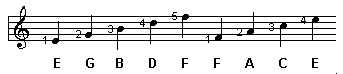
- Naming the notes: on the lines: E, G, B, D, F; in the spaces F, A, C, E. Write them in to the editor and memorise their names:
- Write the scale beginning with C3 (middle C) and finishing with C4.This time do the same, but descending (from high to low):

- Copy and listen to these sounds. Which has the highest pitch? And the lowest? Put them in order from hightest to lowest.

- This note is known as middle B:
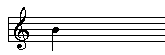
Write one B higher and the other lower. Listen to them. Note that you will need leger lines to write these notes.
To carry out the following exercises, reactivate the bar lines.
|
|
|
Using the program "Music": use the 0 key (zero).
|
- Write this piece on screen, and then into your notebook:
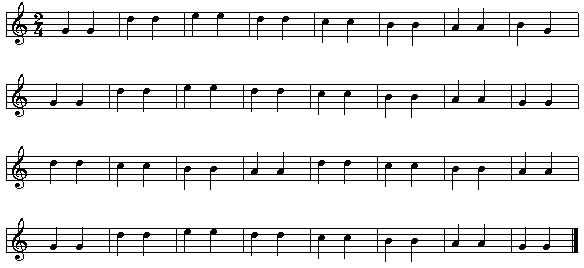
- Open the file DINDON. See how the melody begins in the low register then repeats itself in the high register. Copy the beginning of the melody (two bars) and where this is repeated in the high register (two more bars):
|
|
|
Music : load the file with the key R.
|

- Compose an 8 bar melody using only the notes B, A and G, filled notes, in 2/4 time.
Listen to it, and when you are happy with it, copy it into your notebook to play it on a flute or any other instrument you have to hand.
|
|
|
Using the program "Music": press F10 to play the piece on computer.
Using the program "Music": press F9, then Enter. Stop the sound with Esc.
Modify the frequency values to:
- mín. freq. 6000
- màx. freq. 8000
Listen to the result.
Now enter the following values:
- mín. freq. 200
- màx. freq. 300
Listen to the result again.
What conclusion do you draw? Write them down in your notebook.
|
|

 Description of the activity