|
The acronym MIDI stands for Musical Instruments Digital Interface. It refers to a physical standard of communication between systems (ports, cables, communication protocols), and language features that allow the exchange of data between systems. It is important to remember that MIDI does not transmit sound; it transmits information on how a particular piece of music is to be reproduced. MIDI is the computer equivalent of a musical score.
The basic MIDI system lets you record sequences and reproduce them on synthesisers. To do this, we need a computer with a program that acts as a sequencer, where sequences can be recorded (MIDI data) and sent to the synthesiser (sound generator) connected to an amplification system.
These are the basic components of a MIDI system:
- MIDI Interface
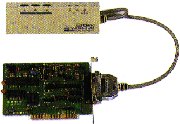 This is a device for sending and receiving MIDI data back and forth from the computer. Many sound cards let you use special ports to hold the joystick so the computer can communicate with electronic musical instruments. The newest musical devices also let you make connections with the RS-232 series port, which all computers come with. This saves you from having to use a specific MIDI adaptor.
- Cables and ports
The ports through which MIDI data circulate all look the same: they are the 5-pin DIM type. MIDI cables have a pin at each end to plug them into the ports. There are three types of MIDI ports:
- The MIDI In port is where data from another device enters.
 The data entering a synthesiser through a MIDI In port is transformed into music. The data entering a synthesiser through a MIDI In port is transformed into music.
- The data that the device itself has generated exit through the MIDI Out port. When we play a MIDI keyboard, we are sending information through the MIDI Out port.
- Data also exit from the MIDI Thru port, but, whereas the data exiting from MIDI Out is produced by the same device, in this case the exiting data is only a copy of the data that has entered the MIDI In port. MIDI Thru is used to link up three or more MIDI devices in the same system.
- MIDI Devices
There are three types of MIDI device:
There are many devices on the market today that carry out a number of these functions: for example, keyboards (controller) generally incorporate a synthesiser (sound generator) and even a disc drive for recording a piece of music (sequencer).
For more information on these devices, see the page on peripherals.
Encoding music with the MIDI system
MIDI is based on a system of messages for encoding musical information. There are two types: channel messages and system messages. It is not necessary for the user to know the deeper meaning of all the messages, since they are generated and interpreted automatically by the devices and programs.
Multitimbric MIDI synthesisers are usually made up of 16 "parts", each of which behaves like a musician in an orchestra, carrying out on a certain instrument the instructions sent to it as if reading a score. Messages can be sent to the whole orchestra (for example, to change pitch or tempo), or only to one of the synthesiser's "musicians" (to play a certain note, play a different instrument, play louder, etc.). Part number 10, the "percussionist", usually carries out certain orders in a different way from the other "musicians".
- Channel messages are those which cause a musical action to be performed on a particular "instrument". There can be up to 16 channels, which means that a synthesiser can act like a 16-piece orchestra with each member receiving individualised information to act on. These are the most usual channel messages:
- Note ON
This message starts to play a note at a certain intensity. It does not tell how long the note will play; it assumes it should continue until a Note OFF message arrives. When the Note ON message is received by part 10 (percussion), it produces a beat on a particular percussion "instrument".
- Note OFF
This message indicates that a note previously activated by Note ON should no longer be played.
- Program Change
 This message is usually sent before the performance starts. It indicates which tone or instrument (e.g. piano, flute, violin) should be used in that channel. Each tone has a number assigned to it from a list of 128 options. Synthesisers bearing the initials GM or GS use a standardised list of tones, called General MIDI.
When part 10 (percussion) receives a Program Change message, it selects a different percussion style (e.g. standard, electronic, jazz or orchestra percussion).
- Control Change
This message modifies other characteristics of the instrument assigned to each channel: volume, panoramic position, vibrato, pitch, pedal, etc.
- System messages affect the general behaviour of the whole device, not only a specific channel. These are the most commonly used system messages:
- Common messages set parameters such as general tuning, tempo, reverberation, etc.
- System exclusive messages, different in each brand and model of synthesiser, give you access to special functions that are very specific to each synthesiser: to show a keyboard display message, activate a special effect, reboot the device, etc.
|
 MIDI
MIDI
 RTEE
RTEE